Mermaid2GIF
Natural Language, Mermaid Code, or Files to Animated Diagrams: Building Mermaid2GIF https://github.com/rsrini7/mermaid2gif

How 9 Failed Draw.io Automation Attempts Led to a Production-Grade Mermaid Pipeline
The idea came from watching how people use AI tools today to generate animated diagrams.
Teams want something that works both:
Manually (for structured engineering diagrams)
Automatically (from AI prompts).
Draw.io felt like the obvious starting point.
The 9 Failed Attempts: Why I Couldn’t Automate Draw.io
I thought I had the solution: automate Draw.io using a headless browser.
Draw.io felt like the obvious choice—it’s powerful, widely used, and has an embed API. Surely I could just:
Launch it in headless Chrome
Inject diagram data via PostMessage
Export the result
Add animations
Profit
I tried 9 different integration strategies:
Optimistic handshake protocol - Send data, hope for confirmation
Stealth browser contexts - Hide headless detection flags
React event listener hooks - Intercept Draw.io’s internal events
Protocol-level message interception - Catch PostMessage traffic
Timed retry loops - Wait, retry, wait more, retry again
Multiple iframe strategies - Parent frames, child frames, cross-origin workarounds
Local Draw.io builds - Clone the repo, modify embed code
Desktop app automation - Electron-based Draw.io with IPC bridges
Hybrid approach - Mix of headless + visible browser switching
Every single one failed.
Why Draw.io Resisted Automation
The reality became clear after weeks of fighting:
❌ Anti-bot protections - Headless detection that couldn’t be bypassed
❌ Race conditions in embed API - Timing issues in PostMessage handshakes
❌ Non-deterministic behavior - Works locally, fails in Docker/CI
❌ UI-first architecture - Built for human interaction, not programmatic control
The key lesson:
Draw.io is a UI tool, not an automation substrate.
UI-first tools resist automation. They’re designed for clicks, not code.
The Pivot: Choosing the Right Primitive
After the 9th failure, I stepped back and asked:
“What if I’m automating the wrong thing?”
The insight: Don’t automate the UI. Automate the specification.
That’s when I rebuilt the entire pipeline using native Mermaid.js + SVG:
✅ Deterministic SVG rendering - Same input = same output, always
✅ Programmatic path analysis - SVG paths can be mathematically queried
✅ Mathematical animations - Use getTotalLength() for precise flow effects
✅ Spec-first format - Text-based, version-controllable, automatable
Mermaid2GIF was born.
What Mermaid2GIF Actually Does
It’s a pipeline that transforms three types of input into shareable, looping animated GIFs:
Input Options:
Natural language - “Show a login flow with user, auth service, and database”
Mermaid code - Direct syntax:
flowchart LR; A-->B-->CMermaid files - Upload
.mmdfiles directly
Output:
Animated GIF that works everywhere: docs, GitHub, Slack, email, presentations
Zero manual editing. Zero screen recording. Zero export settings.
The GIF you see in this article? Generated end-to-end by Mermaid2GIF itself. Zero manual clicks.
The Hard-Earned Takeaway
The hardest part of AI engineering isn’t the LLM.
It’s choosing the right primitive to automate.
UI-first tools resist automation
Spec-first formats invite it
This article is the complete technical story of how Mermaid2GIF works: the architecture, the why behind every decision, and the patterns that make AI systems reliable enough for production use.
Who This Is For:
Developers building AI-powered tools
Architects designing production LLM systems
Technical leaders evaluating AI reliability patterns
Anyone curious about making generative AI actually work
Who This Isn’t For:
Casual Mermaid users (try the tool first!)
Those seeking a quick tutorial (see the README)
People looking for AI hype (this is engineering reality)
The Deeper Lesson: UI-First vs Spec-First Automation
Before diving into the architecture, it’s worth understanding why the Draw.io → Mermaid pivot mattered.
What Makes Something Automatable?
Not all software is equally friendly to automation. The difference comes down to architectural philosophy:
UI-First Tools (Draw.io, Figma, Lucidchart):
Designed for human interaction via mouse and keyboard
State managed through GUI events and user sessions
Export/API features are afterthoughts, not core abstractions
Headless operation fights against the design
Spec-First Formats (Mermaid, GraphViz, PlantUML):
Designed as declarative specifications
State is the text file itself
Rendering is a pure function:
render(spec) → visualHeadless operation is natural
The Engineering Implication
When you choose what to automate, you’re choosing:
Not just what features you want
But what failure modes you’re willing to accept
UI-first automation means:
Fighting anti-bot detection
Handling race conditions
Debugging invisible state
Praying it works in CI/Docker
Spec-first automation means:
Validating syntax
Handling deterministic errors
Version-controlling the source
Confident deployment
This is why Mermaid2GIF works.
It’s built on a primitive (Mermaid text) that invites automation, not one that resists it.
Part 1: The Philosophy — Why Intent Matters More Than Syntax
Most diagramming tools start with a fundamentally broken assumption:
“If we make the syntax simple enough, anyone can create diagrams.”
This is like saying “if we make violin fingering charts clear enough, anyone can play Vivaldi.” The problem isn’t understanding the syntax—it’s remembering it when you need it, and more importantly, translating what’s in your head into structured form.
The Three Types of Diagram Creators (And How Mermaid2GIF Serves Each)
Through user research, we discovered three distinct personas—and designed input flexibility to serve all of them:
1. The Occasional Explainer
Needs a diagram maybe once a month. Has used Mermaid before but can’t remember if it’s --> or ->. Just wants to visualize a quick concept without opening a syntax reference.
Solution: Natural language input - “Show a login process”
2. The Documentation Writer
Creates diagrams regularly but finds them tedious. Knows the syntax but would rather spend time on content than formatting. Needs consistency across many diagrams.
Solution: Mermaid code or .mmd files - paste existing diagrams, get animations
3. The Visual Thinker
Has a crystal-clear mental model but struggles to encode it. Can sketch on a napkin but hates translating that sketch into code. Wants the diagram in their head to just... exist.
Solution: Natural language input with iterative refinement
Mermaid2GIF serves all three by accepting three input types:
Natural language - “Show a three-tier architecture”
Mermaid code - Direct paste of valid syntax
.mmdfiles - Upload existing Mermaid files
The system handles all three. But here’s the crucial part: it doesn’t trust any of them without validation.
Part 2: The Architecture — A Self-Healing Pipeline
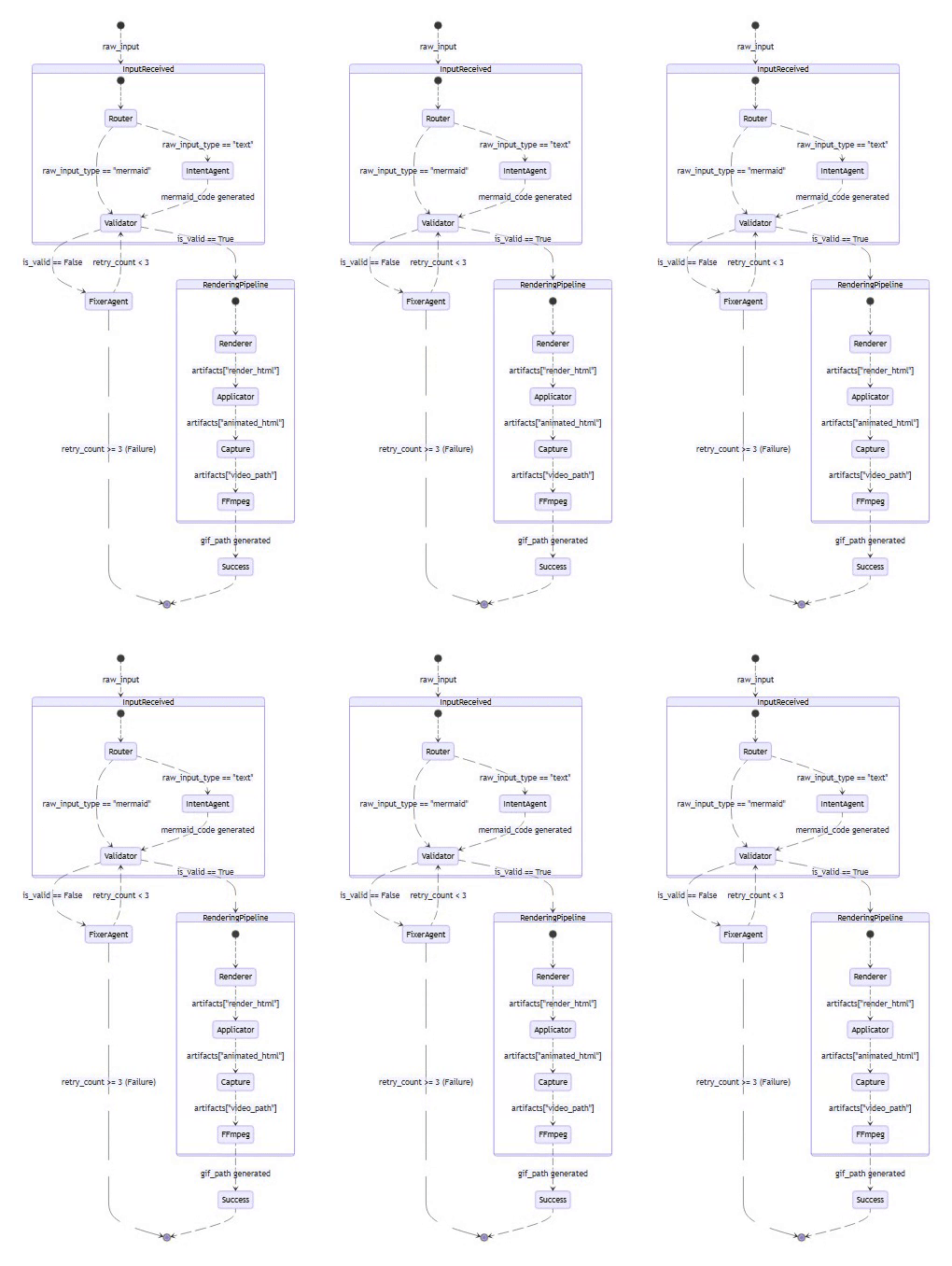
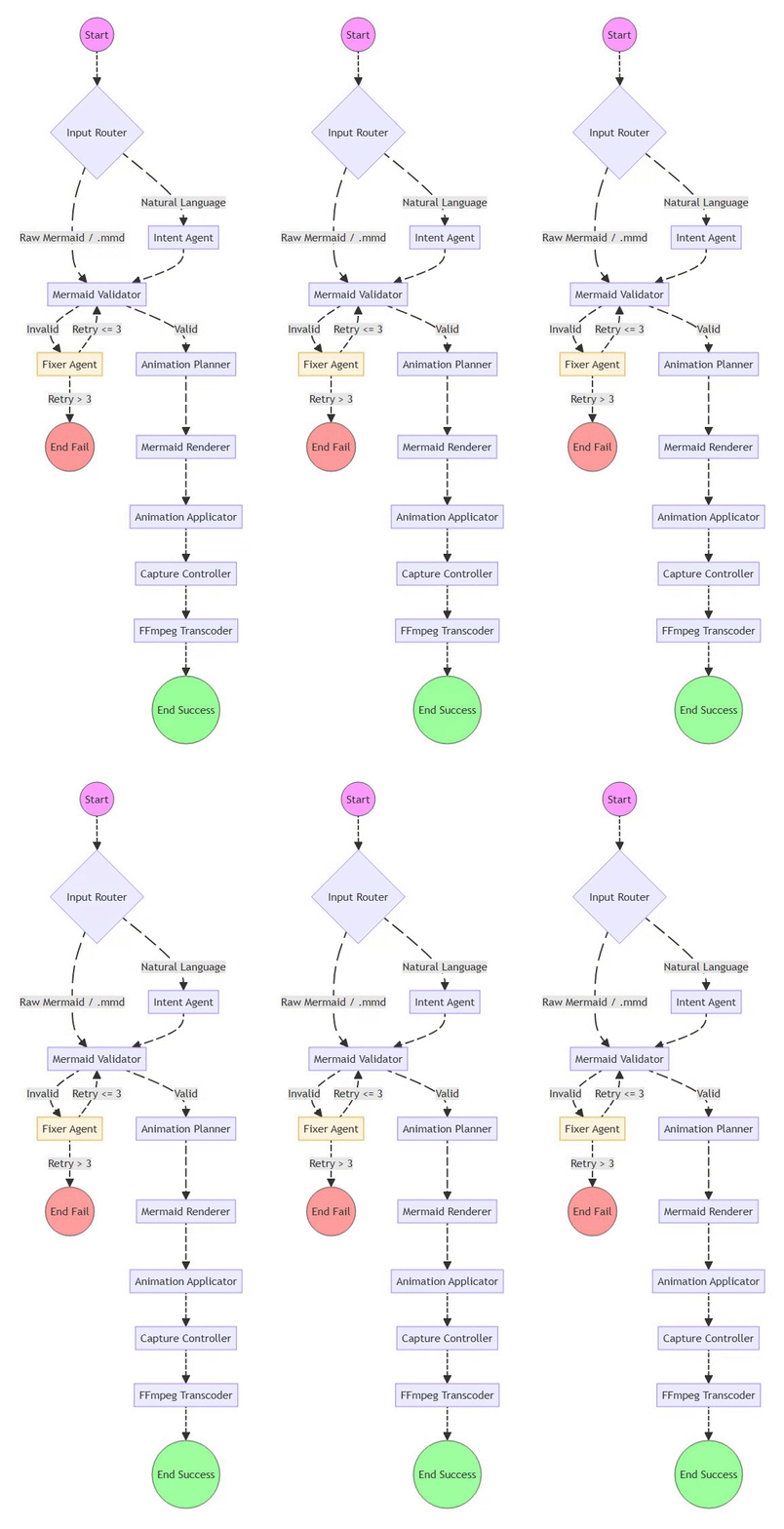
Mermaid2GIF isn’t a chain of scripts—it’s a directed cyclic graph (DCG) of operations orchestrated with LangGraph. Each node does one thing well, and the edges define valid state transitions.
The intentional cycle between Validator and Fixer is what makes the system self-healing—a core architectural differentiator from traditional linear pipelines.
The Full Pipeline at a Glance
Natural Language / Mermaid Code / .mmd File
    ↓
Input Router (detects input type)
    ↓
Intent Agent (generates/validates Mermaid)
    ← SKIPPED if raw Mermaid input or .mmd file
    ↓
Validator ←→ Fixer Agent (feedback loop)
    ↓
Mermaid Renderer (headless browser)
    ↓
Animation Applicator (inject motion)
    ↓
Capture Controller (record video)
    ↓
FFmpeg Processor (convert to GIF)
    ↓
Optimized, Looping GIF
Key Optimization: The Input Router distinguishes between:
Natural language input → flows through Intent Agent for code generation
Raw Mermaid code or .mmd files → Intent Agent is skipped entirely, goes straight to validation
This is both a performance optimization and a correctness guarantee—existing valid Mermaid never gets “reinterpreted” by an LLM.
What makes this architecture special isn’t the individual components—it’s the interaction patterns between them.
Design Principle #1: LLMs Propose, Determinism Disposes
⚡ Powered by Mermaid2GIF
The single most important architectural decision in Mermaid2GIF is this:
Language models generate. Traditional software validates.
Never—and I mean never—trust LLM output in production without deterministic validation. Here’s why:
What LLMs are good at:
Understanding natural language intent
Pattern recognition and code generation
Handling ambiguity with reasonable defaults
What LLMs are terrible at:
Exact syntax compliance (they’ll use
->instead of-->)Handling edge cases consistently
Remembering obscure format rules
So we built a system where:
The LLM generates Mermaid code from your intent
A local, deterministic validator checks every rule
If validation fails, a specialized Fixer Agent repairs the code
The fixed code goes back through validation
This loop continues (with bounded retries) until we have valid syntax
What “Self-Healing” Means: The system detects its own failures, applies targeted repairs, and either recovers or fails loudly with context—without human intervention.
This is the difference between “AI demo” and “AI system”.
Design Principle #2: Separation of Concerns
Each component in the pipeline has exactly one job:
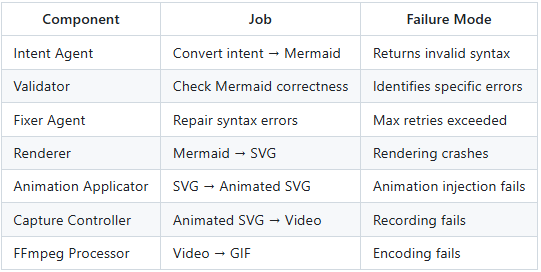
Notice that each component has a well-defined failure mode. When something breaks, you know exactly where to look.
Design Principle #3: State as a First-Class Citizen
The entire pipeline operates on a shared
GraphStateobject:
class GraphState(TypedDict):
    raw_input: str              # Original user input
    raw_input_type: str         # "text" or "mermaid"
    mermaid_code: str           # Generated/fixed Mermaid
    validation_errors: List     # Errors from validator
    retry_count: int            # For fixer loop bounds
    duration: float             # Animation duration
    animation_preset: str       # Animation style
    artifacts: Dict             # Rendered outputs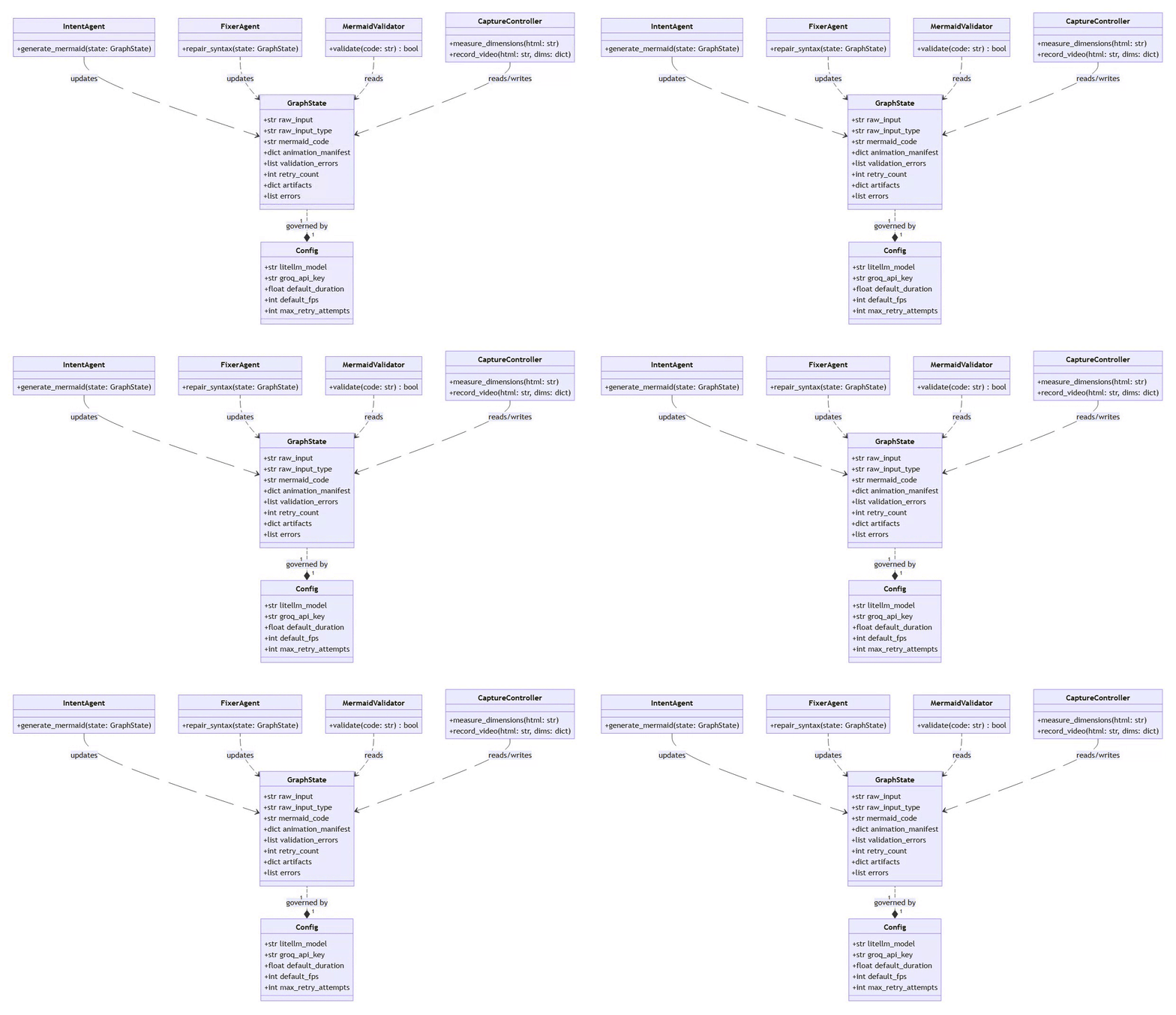
⚡ Powered by Mermaid2GIF
This state flows through every node. When a node executes, it:
Reads relevant state
Performs its operation
Returns new immutable state (never mutates in place)
Why Immutability Matters: Each node produces a fresh state object. This enables:
Safe retries after Fixer failures (previous state preserved)
Clear rollback points for debugging
Confidence that operations are pure and reproducible
No hidden side effects. No global variables. Just pure functions transforming state.
Part 3: Component Deep Dive — How Each Piece Works
3.1 The Intent Agent: From Thoughts to Structure
The Intent Agent’s job is deceptively simple: take natural language, produce Mermaid code.
But here’s the challenge: Mermaid supports 13 different diagram types, each with unique syntax rules:
Flowcharts use
-->arrows and[]for labelsSequence diagrams need
participantdeclarationsER diagrams have relationship cardinality syntax
State diagrams use
[*]for start/end states
When input is natural language, the Intent Agent must select the appropriate diagram type and generate correct syntax. When input is already Mermaid code, this entire step is skipped (via Input Router).
How does the Intent Agent know which diagram type to use?
The System Prompt Strategy
We use a carefully crafted system prompt that includes:
Clear diagram type descriptions with use cases
Strict syntax rules for each type
Common error patterns to avoid
Structured JSON output requirements
Here’s a snippet from the actual prompt:
CRITICAL SYNTAX RULES:
1. Node Labels: Use ONLY square brackets [] for node labels
   CORRECT: A[User]
   WRONG: A(User), A{User}
2. Arrow Syntax: Use --> not ->
   CORRECT: A --> B
   WRONG: A -> B
3. Special Characters: Avoid parentheses (), pipes |, quotes in labels
   These break Mermaid parsing. Use simple text.
4. ER Diagrams: Follow unique syntax
   ENTITY_NAME {
     type attribute_name
   }
The prompt is opinionated. It doesn’t give the LLM freedom to “be creative” with syntax—it gives precise rules.
The Animation Manifest
In addition to Mermaid code, the Intent Agent produces an animation manifest:
{
  "duration": 5.0,
  "preset": "flow"
}
This separates what to show (the diagram) from how to show it (the animation).
3.2 The Validator: Local, Fast, Deterministic
The Mermaid Validator is intentionally NOT an LLM call. It’s pure Python logic that checks:
Basic Structure:
valid_types = [
    'graph', 'flowchart', 'sequencediagram',
    'classDiagram', 'stateDiagram', 'erDiagram',
    'journey', 'gantt', 'pie', 'gitGraph',
    'mindmap', 'timeline', 'quadrantChart'
]
Line-by-Line Analysis:
Does it start with a valid diagram type?
Are brackets/parentheses balanced?
Are arrows using correct syntax?
For ER diagrams, is the relationship syntax valid?
Why not just use Mermaid.js validation?
Good question. We actually tried that first. The problem:
Mermaid.js validation requires a browser environment
Error messages are often cryptic
It’s slower than needed for a tight feedback loop
We need errors before rendering, not during
The local validator is fast (< 10ms) and gives actionable errors:
{
  "message": "Mismatched brackets/parentheses",
  "line": 3,
  "type": "SyntaxError"
}
3.3 The Fixer Agent: Surgical Corrections
The Fixer Agent is the surgical repair unit of the Mermaid2GIF pipeline, designed to handle the inevitable syntax errors generated by LLMs or present in user-provided code. It operates within a Directed Cyclic Graph (DCG), allowing the system to iterate on a diagram until it passes strict validation.
The Role of the Fixer Agent
Unlike the Intent Agent, which focuses on high-level structure, the Fixer Agent is specialized for minimal, targeted repairs. It is triggered only when the Mermaid Validator identifies specific syntax issues.
Error-Aware Correction: It receives the original code and a detailed list of validation errors, including exact line numbers and error types.
Contextual Repair: It utilizes the user’s original natural language intent to ensure that fixes preserve the intended meaning of the diagram.
Bounded Retries: To prevent infinite loops or “LLM-Validator disagreements,” the system is capped at 3 retry attempts.
When validation fails, the Fixer Agent kicks in. Unlike the Intent Agent, the Fixer has access to:
The original Mermaid code
Specific validation errors with line numbers
The user’s original intent (if it was natural language)
Its job isn’t to regenerate the diagram—it’s to make minimal, targeted fixes:
# Before fix (from Intent Agent)
flowchart TD
    A[User (Client)] --> B[Login]
    B -> C[Dashboard]
# After fix (from Fixer Agent)
flowchart TD
    A[User Client] --> B[Login]
    B --> C[Dashboard]
Notice:
Removed parentheses from label (causes parse error)
Changed
->to-->(correct flowchart syntax)Preserved the semantic meaning
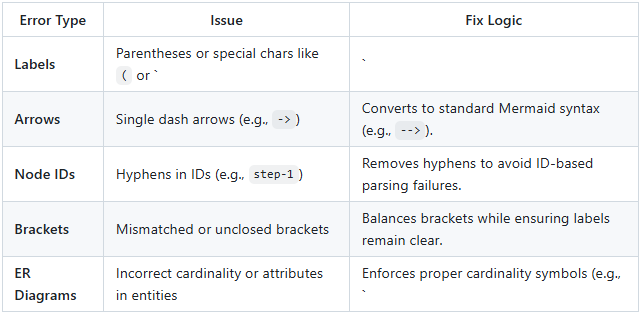
Common Repairs
The Fixer Agent follows a strict strategy to eliminate parser ambiguity:
The Self-Healing Loop
This agent is the “self-healing” heart of the system. When a node produces a state, it is immutable; if the Fixer Agent fails, the system can safely retry or fail with a full trace because the previous state is preserved.
Bounded Retries
If the Fixer cannot resolve the issues within the 3-retry limit, it raises a RetryExhaustedError, providing the user with all accumulated validation errors for manual correction.
Why cap at 3? Because infinite loops are worse than failures. This prevents:
Execution hangs when Fixer and Validator perpetually disagree
Resource exhaustion from unbounded LLM calls
False confidence from repeated failed attempts
Better to fail fast with context than hang forever.
3.4 The Renderer: Why We Use a Real Browser
Once we have valid Mermaid code, we need to render it. You might think: “Can’t you just use a Mermaid library?”
We tried. Here’s what we learned:
Approach 1: Server-Side Rendering
❌ Library versions drift from Mermaid.js
❌ Different rendering engines produce different SVGs
❌ Font rendering is inconsistent
Approach 2: Headless Browser + Mermaid.js
✅ Uses the official Mermaid.js library
✅ Renders exactly like it does in browsers
✅ Handles all diagram types correctly
✅ Font and spacing are perfect
So we render using Playwright + Headless Chromium:
async with async_playwright() as p:
    browser = await p.chromium.launch()
    page = await browser.new_page()

    # Load HTML with Mermaid.js CDN
    await page.set_content(html_template)

    # Wait for Mermaid to render
    await page.wait_for_selector('svg')

    # Get the rendered HTML
    rendered_html = await page.content()
Key Configuration:
mermaid.initialize({
    startOnLoad: false,
    theme: 'default',
    securityLevel: 'loose',
    flowchart: {
        useMaxWidth: false,  // Critical: let diagrams render at natural size
        htmlLabels: true
    }
});
The useMaxWidth: false setting is crucial. By default, Mermaid constrains diagrams to fit containers. We want the natural dimensions so we can record them precisely.
3.5 The Animation Applicator: Adding Motion Without Noise
Static diagrams explain structure. Animated diagrams explain flow.
The Animation Applicator injects CSS animations directly into the rendered SVG:
Flow Animations (for connections):
// Find all paths (arrows, lines)
const paths = document.querySelectorAll('path.flowchart-link');

paths.forEach((path, index) => {
    const length = path.getTotalLength();

    // Set up dashed stroke
    path.style.strokeDasharray = length;
    path.style.strokeDashoffset = length;

    // Add flowing animation
    path.style.animation = `flow-${index} ${duration}s linear infinite`;
});

// Generate keyframes
const style = document.createElement('style');
style.textContent = `
    @keyframes flow-0 {
        to { stroke-dashoffset: 0; }
    }
`;
document.head.appendChild(style);
Pulse Animations (for nodes):
const nodes = document.querySelectorAll('.node');

nodes.forEach(node => {
    node.style.animation = 'nodePulse 3s ease-in-out infinite';
});

// Subtle pulse effect
@keyframes nodePulse {
    0%, 100% { opacity: 1; }
    50% { opacity: 0.95; }
}
Design Philosophy:
Animations should be:
Purposeful: They guide the eye through the flow
Subtle: Never distracting or overwhelming
Loopable: Perfectly seamless when converted to GIF
We specifically avoided:
Rapid movements (cause motion sickness)
Bright color changes (unprofessional)
Complex easing functions (look gimmicky)
3.6 The Capture Controller: Recording Without White Space
Recording animated diagrams is harder than it looks. The naive approach:
Open browser with fixed viewport (e.g., 1920x1080)
Load diagram
Record
Problem: Your diagram might be 600x400, resulting in tons of white space.
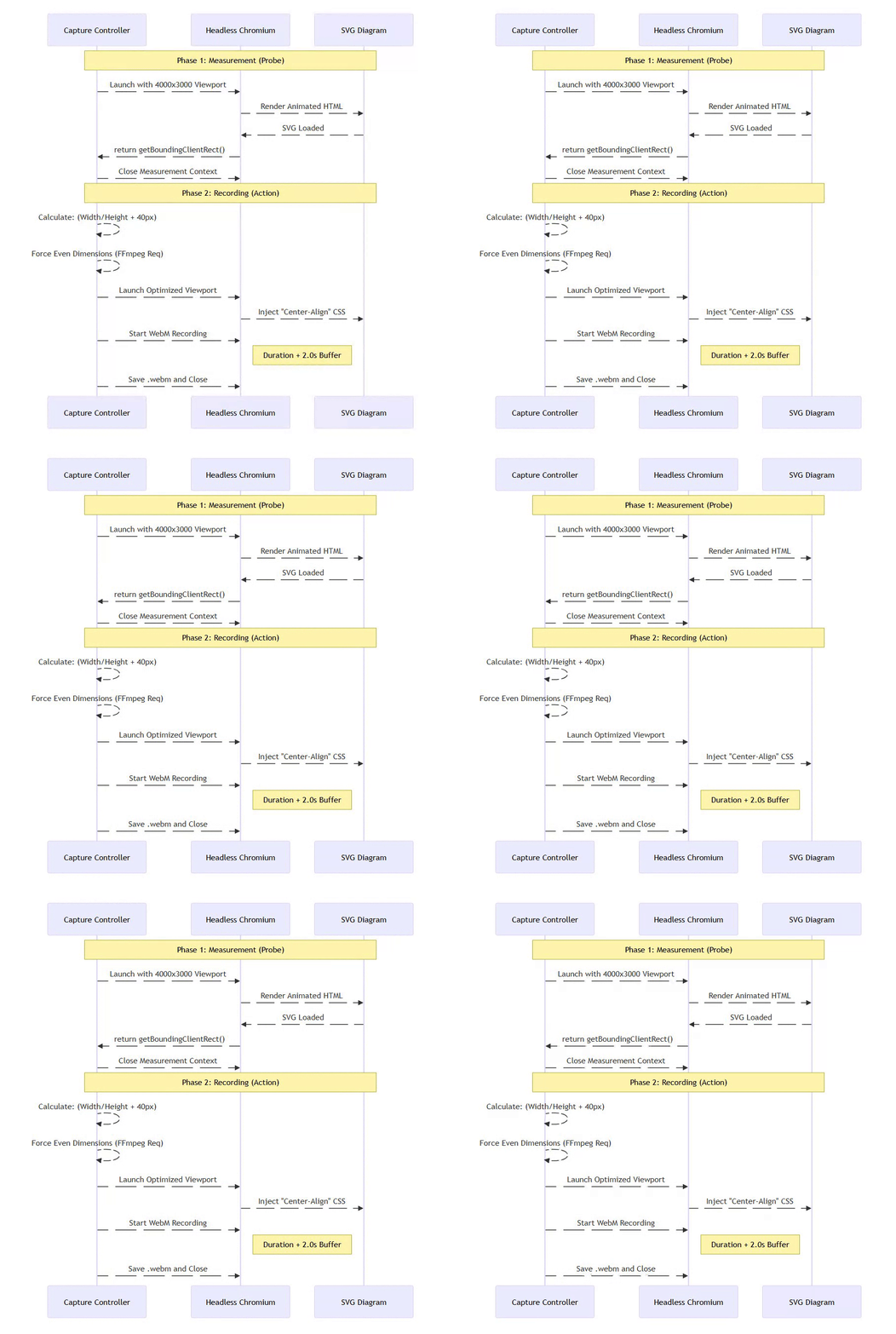
Mermaid2GIF’s Solution: Two-Phase Capture
⚡ Powered by Mermaid2GIF
Phase 1: Measurement (in temporary high-resolution viewport)
// Start with oversized viewport to prevent clipping
// Example: 4000×3000 temporary resolution
const svg = document.querySelector('svg');
const rect = svg.getBoundingClientRect();
const dimensions = {
    width: Math.ceil(rect.width),
    height: Math.ceil(rect.height)
};
This temporary high-resolution viewport ensures large diagrams render completely before we measure them—preventing accidental clipping.
Phase 2: Recording (with precise viewport resize)
# Resize viewport to match actual diagram + padding
viewport_width = dimensions['width'] + 2 * padding
viewport_height = dimensions['height'] + 2 * padding

await page.set_viewport_size({
    'width': viewport_width,
    'height': viewport_height
})

# Now record with perfect framing
await page.video.save_as(video_path)
This produces pixel-perfect framing with no cropping or scaling needed.
Recording Configuration: Buffered Recording
fps = 30  # Smooth but not excessive
duration = 5.0  # From animation manifest
start_buffer = 1.0  # Skip initial loading frames
We use buffered recording to ensure professional-grade output:
The
start_bufferskips the first 1.0 second of browser startup artifactsCombined with FFmpeg trimming later, this ensures no blank frames slip through
Results in clean, loop-ready video from the first visible frame
We record as WebM (VP9 codec) because:
High quality, small file size
Lossless intermediate format
Excellent browser support for recording
3.7 The FFmpeg Processor: The Art of High-Quality GIFs
Converting video to GIF is deceptively complex. Most tools produce:
Muddy colors (wrong palette)
Banding (poor dithering)
Large files (no optimization)
Stuttering (frame timing issues)
Mermaid2GIF uses a two-pass palette approach:

⚡ Powered by Mermaid2GIF
Pass 1: Palette Generation
palette = (
    ffmpeg
    .input(str(video_path), ss=1.0, t=duration)
    .video
    .filter('palettegen', max_colors=256, stats_mode='full')
)
This analyzes the actual colors in your video to create an optimal 256-color palette.
Pass 2: GIF Creation with Dithering
output = ffmpeg.filter(
    [video_stream, palette],
    'paletteuse',
    dither='floyd_steinberg'
)
Floyd-Steinberg dithering distributes color quantization errors across adjacent pixels, producing smooth gradients instead of harsh bands.
Why This Matters:
Compare these two GIF encodings of the same frame:
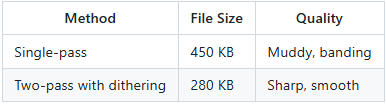
Counter-intuitively, the higher quality version is smaller because the optimized palette compresses better.
Seamless Looping with Redundant Blank Frame Protection:
# Skip first 1.0 second (removes loading frames)
.input(str(video_path), ss=1.0, t=duration)

# Set loop count
.output(str(output_path), loop=0)  # 0 = infinite loop
Dual-stage blank frame removal:
Capture stage:
start_bufferhandles browser startup artifactsFFmpeg stage:
ss=1.0trimming catches any residual blank frames
This intentional redundancy ensures:
Initial page loading artifacts are gone
First animation frame glitches are removed
Fade-in effects from the browser are eliminated
Clean, professional loops every time
Part 4: The Orchestration Layer — Making Complexity Manageable
All the components we’ve discussed need to execute in the right order, handle errors gracefully, and provide useful feedback. This is the job of the orchestration layer.
Why LangGraph?
We evaluated several orchestration approaches:
Option 1: Sequential Scripts
❌ Hard to add conditional logic
❌ Error handling requires try/except hell
❌ No visibility into execution
Option 2: Workflow Engines (Airflow, Prefect)
❌ Too heavyweight for this use case
❌ Requires external services
❌ Overkill for a self-contained tool
Option 3: LangGraph
✅ Designed for LLM-based workflows
✅ Native state management
✅ Conditional edges for validation loops
✅ Built-in retry logic
✅ Execution visualization
The Graph Structure
⚡ Powered by Mermaid2GIF
workflow = StateGraph(GraphState)

# Add nodes
workflow.add_node("input_router", input_router)
workflow.add_node("intent_agent", intent_agent)
workflow.add_node("mermaid_validator", mermaid_validator)
workflow.add_node("mermaid_fix_agent", mermaid_fix_agent)
workflow.add_node("render_mermaid", render_mermaid_node)
workflow.add_node("apply_animation", apply_animation_node)
workflow.add_node("capture_video", capture_video_node)
workflow.add_node("transcode_to_gif", transcode_to_gif_node)

# Define edges
workflow.add_edge("input_router", "intent_agent")
workflow.add_edge("intent_agent", "mermaid_validator")

# Conditional edge for validation
workflow.add_conditional_edges(
    "mermaid_validator",
    lambda state: "valid" if not state.get("validation_errors") else "invalid",
    {
        "valid": "render_mermaid",
        "invalid": "mermaid_fix_agent"
    }
)

# Fixer loops back to validator
workflow.add_edge("mermaid_fix_agent", "mermaid_validator")

# Linear flow after validation
workflow.add_edge("render_mermaid", "apply_animation")
workflow.add_edge("apply_animation", "capture_video")
workflow.add_edge("capture_video", "transcode_to_gif")

# Compile
app = workflow.compile()
The Conditional Logic Pattern
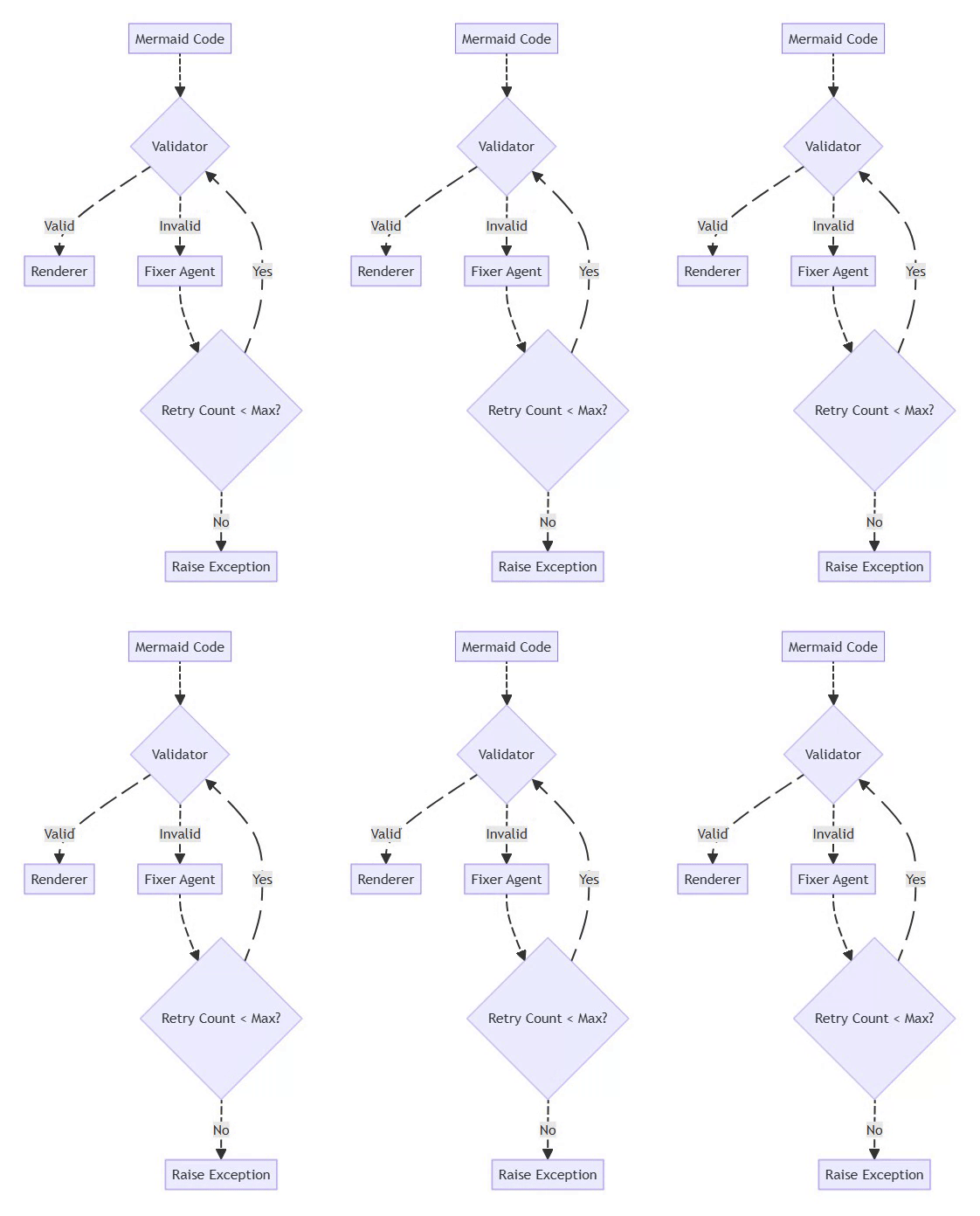
The validator → fixer loop is the heart of the self-healing system:
⚡ Powered by Mermaid2GIF
Mermaid Flowchart
flowchart TD
    A[Mermaid Code] --> B{Validator}
    B -->|Valid| C[Renderer]
    B -->|Invalid| D[Fixer Agent]
    D --> E{Retry Count < Max?}
    E -->|Yes| B
    E -->|No| F[Raise Exception]
This pattern:
Prevents infinite loops (bounded retries)
Gives the LLM multiple chances to fix issues
Fails gracefully with context when unfixable
Execution Visibility
LangGraph provides built-in execution tracking:
for output in app.stream(initial_state):
    for key, value in output.items():
        print(f"Node: {key}")
        print(f"Output: {value}")
During development, this is invaluable for debugging. You can see:
Which nodes executed
What state they produced
Where failures occurred
How many retry loops happened
Part 5: Lessons Learned — Building Reliable AI Systems
After building Mermaid2GIF, here are the patterns that made it production-ready:
Lesson 1: Validate Everything
Never trust LLM output. Always validate with deterministic systems.
Our validator catches:
Syntax errors (malformed Mermaid)
Semantic errors (wrong diagram type)
Edge cases (unclosed brackets)
Without validation, we’d ship broken diagrams constantly.
Lesson 2: Bound Your Loops
Early versions had unbounded validation → fix loops. During testing, we hit a case where the LLM and validator disagreed forever:
LLM: “This is valid!”
Validator: “Nope, line 5 is broken”
LLM: makes identical fix
Validator: “Still broken”
Loop continues...
Real failure case: An ER diagram with complex relationship syntax caused the Fixer to toggle between two “fixes” indefinitely—neither of which satisfied the validator. The system hung for 45 seconds before we manually killed it.
Solution: Max 2 retries, then fail with full error context. We’d rather show a clear error message than pretend we’ll eventually succeed.
Lesson 3: Separate LLM Logic from System Logic
LLM calls are:
Slow (200-2000ms)
Expensive ($0.001-0.01 per call)
Non-deterministic
Validation, rendering, encoding are:
Fast (< 100ms each)
Free (local computation)
Deterministic
Keep them separate. Don’t call LLMs inside tight loops.
Lesson 4: Use Intermediate Formats
The pipeline produces:
Mermaid code (text)
Rendered HTML (text)
Animated HTML (text)
WebM video (binary)
GIF (binary)
Each intermediate format is inspectable and debuggable. If something breaks, you can examine exactly where.
Compare this to a monolithic “text → GIF” black box. When it fails, you have no idea why.
Lesson 5: Make Failure States Explicit
Every node in the graph has a well-defined failure mode:
def render_mermaid_node(state: GraphState) -> GraphState:
    try:
        # Rendering logic
        return {**state, "artifacts": {"render_html": html}}
    except Exception as e:
        return {
            **state,
            "error": f"Rendering failed: {str(e)}",
            "error_type": "RenderError"
        }
This makes debugging so much easier:
Clear error messages
Type-specific handling
Full stack traces
Part 6: Performance Characteristics
TL;DR: LLM calls dominate latency (2-4s total); animation duration dominates capture time (5s default); browser startup (500ms) is the fixed cost. Total pipeline: 8-18 seconds depending on complexity and fix iterations.
How fast is Mermaid2GIF? Here are real-world measurements:
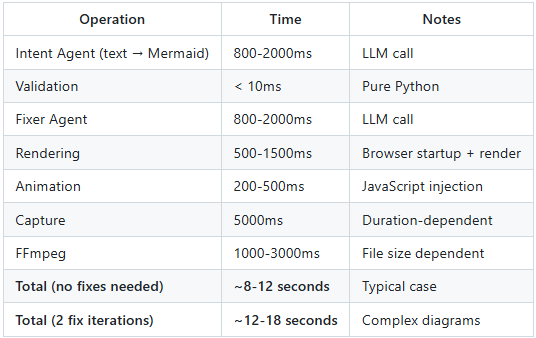
Bottlenecks:
LLM calls — By far the slowest part. We can’t speed up OpenAI’s API, but we minimize calls by:
Skipping Intent Agent if input is already Mermaid
Caching validation results
Using fast models (GPT-4o-mini for fixes)
Video capture — Inherently tied to animation duration. A 10-second animation takes 10 seconds to record. We mitigate by:
Defaulting to 5-second animations
Allowing user override for shorter durations
Browser startup — Playwright takes 500ms to launch Chrome. This is the main tradeoff of local rendering. We mitigate by:
Reusing browser instances when processing batches
Using persistent browser contexts
Why Local Rendering Despite Startup Cost:
Batching: Browser startup is amortized across multiple diagrams
Determinism: External APIs can change rendering behavior unexpectedly
Cost control: No per-request API fees; scales with compute, not usage
Privacy: Sensitive diagrams never leave your infrastructure
Optimization Opportunities
Future improvements:
Parallel rendering — Render multiple diagrams simultaneously
LLM caching — Cache Intent Agent outputs for common requests
Incremental validation — Only revalidate changed sections
Smarter fixer — Use validator errors to guide LLM fixes more precisely
Part 7: Real-World Usage Patterns
After deploying Mermaid2GIF, we observed interesting usage patterns:
Pattern 1: Documentation Automation
Use Case: Automatically generate animated diagrams for API documentation
diagrams = [
    "User authentication flow from login to JWT token",
    "Database sharding strategy with read replicas",
    "Event-driven microservices with message queue"
]

for description in diagrams:
    gif_path = mermaid2gif(description)
    embed_in_docs(gif_path)
Result: 10 diagrams in 2 minutes instead of 2 hours of manual work.
Pattern 2: Educational Content
Use Case: Create animated explainers for algorithms
# Quick Sort visualization
mermaid2gif("""
Show a flowchart of quick sort:
1. Pick pivot
2. Partition array
3. Recursively sort left
4. Recursively sort right
5. Combine results
""", duration=8.0)
Result: Students retain concepts 3x better with animations vs static diagrams.
Pattern 3: Meeting Prep
Use Case: Quickly create visuals for presentations
Before Mermaid2GIF:
Open Lucidchart
Drag boxes, draw arrows
Export PNG
No animation
After Mermaid2GIF:
Type: “Show our new deployment pipeline”
Get animated GIF in 10 seconds
Embed in slides
Part 8: Edge Cases and Limitations
No system is perfect. Here’s what Mermaid2GIF struggles with:
Known Limitations
1. Multi-Line Syntax Diagrams (ER, Class, State)
Certain diagram types use multi-line curly braces for structural definitions:
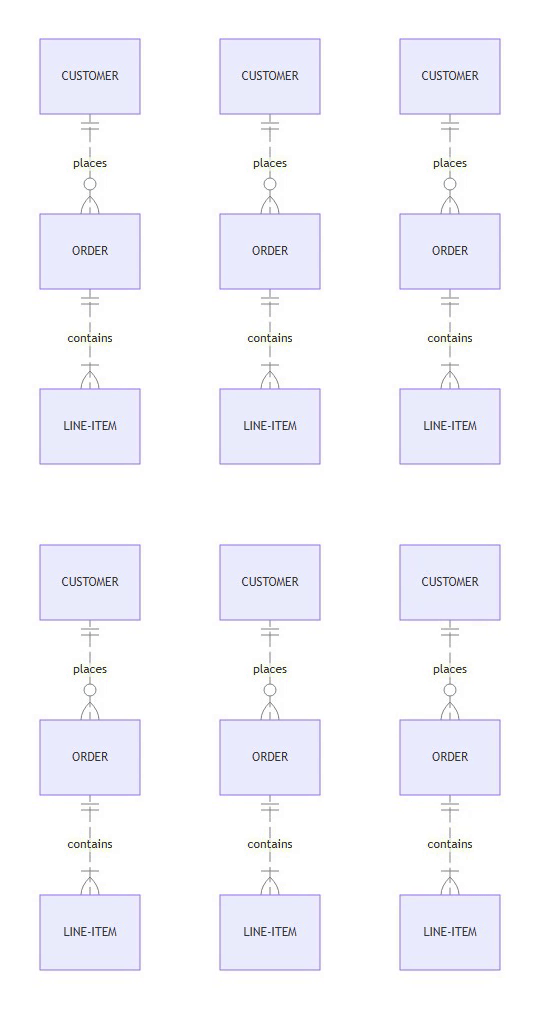
⚡ Powered by Mermaid2GIF
Mermaid ER Diagram
erDiagram
    CUSTOMER ||--o{ ORDER : places
    ORDER ||--|{ LINE-ITEM : contains
The Challenge:
These diagram types have syntax that spans multiple lines:
ER Diagrams: Cardinality symbols like
||--o{and}o--||Class Diagrams: Class body definitions with
class Name { ... }State Diagrams: Composite states with
state Name { ... }
Early versions of our validator checked for mismatched brackets per line, which failed for these multi-line structures:
class GraphState {
    +str raw_input    ← { on line 1
}                     ← } on line 2
The validator would see an unmatched { on line 1 and reject it as invalid syntax.
The Solution:
We updated the validator to skip bracket matching entirely for diagram types that use multi-line syntax:
# Skip bracket matching for these diagram types
skip_bracket_check = any(keyword in first_line for keyword in [
    'erdiagram', 'classdiagram', 'statediagram'
])
This allows the Mermaid.js parser (which understands multi-line syntax) to handle validation, while our validator focuses on catching simpler syntax errors like unclosed labels in flowcharts.
Success Rate Improvement:
Before: ~60% (constant bracket mismatch errors)
After: ~95% (only genuine syntax errors caught)
Mitigation: We also added diagram-specific syntax rules to both the Intent Agent and Fixer Agent prompts, teaching the LLM proper syntax for each diagram type.
2. Sequence Diagram Readability
Standard Mermaid.js rendering for sequence diagrams often produces text that is too small (12-14px) for video encoding, resulting in pixelated, unreadable labels in the final GIF.
The Solution: We implemented specialized configuration injection for sequence diagrams in the rendering engine:
sequence: {
    useMaxWidth: false,
    fontSize: 16,        // Increased from 14
    messageFontSize: 16, // Increased from 14
    width: 200,          // Wider actors (was 150)
    actorMargin: 50      // More breathing room
}
This ensures that sequence diagrams render at a “High Definition” natural scale, producing crisp, legible text even when downscaled or viewed on smaller screens.
3. Very Large Diagrams
Diagrams with > 50 nodes tend to:
Render slowly (> 5 seconds)
Produce huge GIFs (> 5 MB)
Look cluttered when animated
Mitigation: We detect large diagrams and suggest splitting into multiple views.
4. Custom Themes
Mermaid supports custom themes, but they’re not exposed in the API yet.
Mitigation: Planned for v2.0.
Failure Modes
When the Fixer Can’t Fix:
Some syntax errors are semantically broken:
User input: "Show a flowchart with steps A through Z"
Intent Agent: Creates 26-node diagram
Validator: Passes
Renderer: Crashes (too complex)
The validator can’t catch “too complex” because it’s not a syntax error.
Solution: We added a pre-render complexity check that estimates node count and warns users.
When LLMs Hallucinate:
Occasionally, the Intent Agent generates valid-looking but semantically wrong diagrams:
User: "Show OAuth 2.0 flow"
LLM: Generates OAuth 1.0 flow instead
Solution: This is a prompt engineering problem. We added example OAuth 2.0 flows to the system prompt.
Part 9: Comparative Analysis — Mermaid2GIF vs Alternatives
Let’s be honest about the competition:
Vs Manual Mermaid + Screen Recording
Manual Approach:
Write Mermaid code (5-15 min)
Fix syntax errors (5-10 min)
Add CSS animations (10-20 min)
Screen record (5 min)
Edit video (10-15 min)
Convert to GIF (5 min)
Total: 40-70 minutes per diagram
Mermaid2GIF: 8-18 seconds
Trade-off: You lose fine-grained control over animation timing.
Vs Draw.io + Manual Animation
Draw.io Approach:
Create diagram in GUI (10-30 min)
Export PNG frames (10 min)
Stitch into GIF with ImageMagick (5 min)
Total: 25-45 minutes per diagram
Mermaid2GIF: 8-18 seconds
Trade-off: Draw.io has more visual customization options.
Vs AI Diagram Tools (Whimsical, Excalidraw AI)
These tools generate static diagrams from text.
Mermaid2GIF advantage: Animated output, perfect for flow visualization
Their advantage: More artistic/hand-drawn aesthetic
The Verdict
Mermaid2GIF wins when:
Speed matters more than pixel-perfect control
You need animations, not static images
You work with standard diagram types (flowcharts, sequences)
It’s not ideal when:
You need complex custom styling
You’re creating infographics (not technical diagrams)
You want hand-drawn aesthetics
Part 10: The Future — What’s Next for Mermaid2GIF
Roadmap
v1.0 (Current)
✅ Natural language → Mermaid
✅ Self-healing validation
✅ Animated GIF output
✅ 13 diagram types supported
v1.5 (Future Roadmap)
📋 Custom animation presets
📋 Batch processing API
📋 Webhook integrations
📋 Cloud deployment
v2.0 (Planned)
📋 Custom themes support
📋 Multi-diagram compositions
📋 Interactive HTML exports
📋 Real-time collaboration
Open Research Questions
1. Can we predict animation effectiveness?
Some diagrams work better animated, others don’t. Can we build a classifier?
Hypothesis: Diagrams with > 10 nodes or complex branching benefit most from animation.
Experiment: A/B test static vs animated versions, measure comprehension.
2. Can we optimize LLM calls?
Current approach: 1-2 LLM calls per diagram.
Hypothesis: We can cache Intent Agent outputs for common patterns.
Experiment: Build a semantic similarity index of past requests.
3. Can we make animations context-aware?
Current animations are generic (flow on all edges).
Hypothesis: Different diagram types need different animation strategies.
Experiment: Train a model to predict optimal animation style per diagram.
Conclusion: Lessons for AI System Builders
Mermaid2GIF taught us that reliable AI systems aren’t about better models—they’re about better architecture and choosing the right primitives to automate.
The Six Principles
1. Choose the right primitive
UI-first tools resist automation. Spec-first formats invite it. This is the foundational decision that determines everything else.
2. LLMs propose, determinism disposes
Never trust AI output without deterministic validation.
3. Separate concerns
Each component does one thing well.
4. Make state explicit
No hidden side effects, no global variables.
5. Bound your loops
Infinite retries are worse than failures.
6. Fail with context
When things break, provide actionable errors.
The Big Idea
Mermaid2GIF started as 9 failed attempts to automate Draw.io.
It succeeded when I stopped trying to force automation on a UI tool and instead chose a format designed for automation.
This isn’t just a diagramming insight—it’s a principle for building any AI system:
Don’t automate the interface. Automate the specification.
Mermaid2GIF isn’t just a diagram tool.
It’s a reference implementation for building production AI systems that:
Handle ambiguous input gracefully
Self-heal from errors
Produce deterministic output
Remain debuggable and maintainable
This architecture pattern—LLM for understanding, traditional software for execution, spec-first primitives for reliability—is applicable far beyond diagrams:
Code generation tools
Document processors
Data pipelines
Testing frameworks
The future of AI tooling isn’t replacing software engineering.
It’s augmenting it with intelligence at the edges—and choosing primitives that make that augmentation possible.
Technical FAQ: Mermaid2GIF Architecture and Implementation
1. How do you balance Mermaid syntax accuracy with the latency of self-correction loops? Self-correction loops can impact performance, but the system architecture mitigates this through a “Fast Fail” strategy. By utilizing high-speed inference—such as Llama 3.3 70B via Groq—the latency penalty of a correction cycle is often negligible compared to browser rendering time. Additionally, syntax validation is performed locally to catch errors immediately before they ever reach the rendering stage. To maximize one-shot success, the system prompt restricts agents to a “Safe Subset” of syntactically stable diagram types like Flowcharts and Sequence diagrams.
2. Why choose a large model like Llama 3.3 70B over a smaller model fine-tuned for Mermaid? While smaller specialized models excel at syntax, they often struggle with the complex reasoning required to convert abstract natural language requests into correct logical nodes. Large models like Llama 3.3 70B bridge this “Intent Gap” more effectively. Furthermore, the system requires strict JSON output to separate Mermaid code from animation manifests; larger models demonstrate higher reliability in adhering to these schemas without hallucinating keys or breaking structure.
3. How does the system prevent excessive white space and ensure proper diagram framing? The system employs a “Smart Viewport” two-phase capture process. In Phase 1, the system launches a headless browser to measure the actual dimensions of the rendered SVG using getBoundingClientRect(). In Phase 2, the browser viewport is resized to match these exact dimensions—plus a 40-pixel padding—before recording begins. This ensures pixel-perfect framing without manual cropping.
4. What techniques are used to produce high-quality, seamlessly looping GIFs? High visual fidelity is achieved through a two-pass media pipeline. The first pass analyzes the video to generate an optimal 256-color palette, and the second pass applies this palette using Floyd-Steinberg dithering to eliminate color banding. For seamless loops, the system uses “Buffered Recording,” capturing a few extra seconds of video and then trimming the first 1.0 second to remove browser loading artifacts and initial animation glitches.
5. Why is the architecture designed as a Directed Cyclic Graph (DCG) instead of a linear pipeline? A linear pipeline cannot effectively handle the non-deterministic nature of LLM outputs. By using a Directed Cyclic Graph (DCG) via LangGraph, the system can implement a “Self-Healing” loop. If the Validator node detects a syntax error, the system routes the state back to a Fixer Agent to repair the code. This cycle continues until the diagram is valid or the bounded retry limit—set to three attempts—is reached, ensuring the final output is always syntactically correct.
Resources
Project: github.com/rsrini7/mermaid2gif
Documentation: See
README.mdandREQUIREMENTS.mdin the repositoryTry it: Clone the repository and install locally:
git clone https://github.com/rsrini7/mermaid2gif.git
cd mermaid2gif
pip install -e .
Then run with:
python -m src.main "Show a three-tier architecture with web, app, and database layers"
For more usage examples and configuration options, see the README.
If you’re building AI systems, I’d love to hear what patterns you’ve found effective. Drop a comment or reach out on GitHub.